
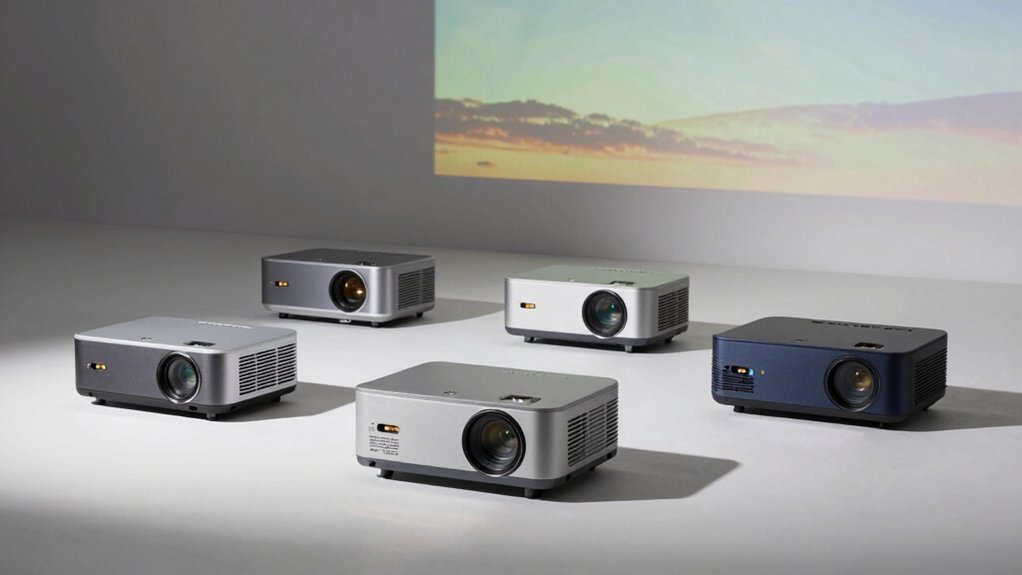
You’re scaling up your artwork, but you’re stuck between optical projectors and digital models. You’ve got budget constraints, space limitations, and specific tracing needs that don’t fit neatly into standard categories. The right projector can transform your creative process—or become an expensive paperweight. What separates a game-changer from a waste?
| Artograph EZ Tracer Opaque Art Projector with Enlargement |  | Best for Enlargement | Primary Use Case: Opaque image enlargement (2x-10x) for tracing | Projection Type: Opaque (non-digital paper images only) | Display Resolution: Not applicable (opaque projector) | CHECK ON AMAZON | Read Our Analysis |
| Optical Drawing Board Projector for Artists and Students | 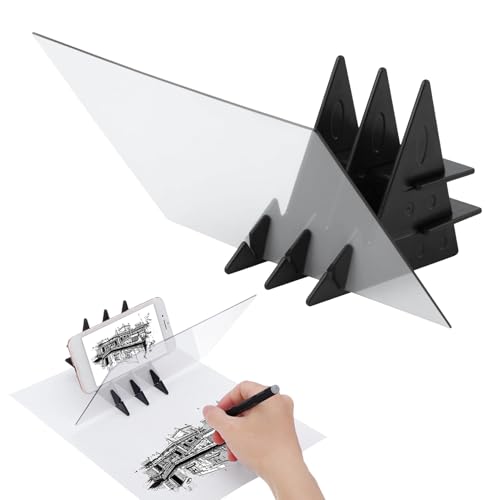 | Best for Beginners | Primary Use Case: Digital image projection for painting/sketching | Projection Type: Digital (smartphone/tablet screen mirroring) | Display Resolution: Not specified | CHECK ON AMAZON | Read Our Analysis |
| Artograph LED Tracer Opaque Art Projector with Enlargement |  | Best Overall | Primary Use Case: Opaque image enlargement (up to 14x) for tracing | Projection Type: Opaque (non-digital paper images only) | Display Resolution: Not applicable (opaque projector) | CHECK ON AMAZON | Read Our Analysis |
| Caydo P1 Art Projector with Auto Focus & Keystone |  | Most Advanced Features | Primary Use Case: Digital image projection with drawing software tools | Projection Type: Digital (smartphone/tablet and device connectivity) | Display Resolution: 4K support | CHECK ON AMAZON | Read Our Analysis |
| Drawing Projector Art Tracing Tool with Stand | 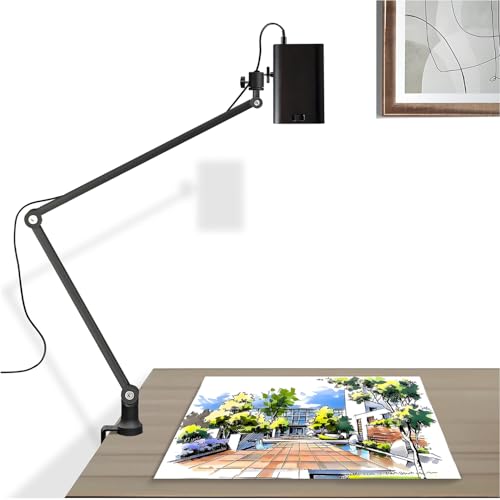 | Best Dual-Purpose | Primary Use Case: Dual-purpose tracing projector and movie/presentation projector | Projection Type: Digital (wireless and wired screen mirroring) | Display Resolution: 1280×720 with 4K support | CHECK ON AMAZON | Read Our Analysis |
| Art Projector for Tracing Drawing Painting (White) |  | Best Resolution | Primary Use Case: Digital image projection for tracing and copying | Projection Type: Digital (USB, WiFi, and wired screen mirroring) | Display Resolution: 1920×1080 FHD | CHECK ON AMAZON | Read Our Analysis |
| MEDAMOC Art Projector for Drawing and Tracing |  | Most Portable | Primary Use Case: Digital image projection for tracing and drawing | Projection Type: Digital (WiFi, USB, and cable connectivity) | Display Resolution: 1280×720 | CHECK ON AMAZON | Read Our Analysis |
| Art Projector for Tracing and Drawing with Stand | 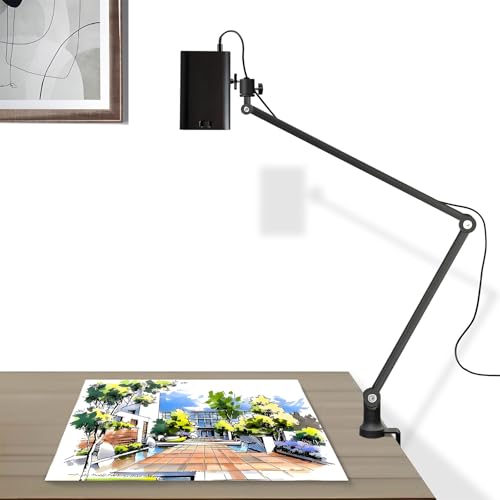 | Best Value | Primary Use Case: Dual-purpose tracing projector and movie/presentation projector | Projection Type: Digital (wireless and wired screen mirroring) | Display Resolution: 1280×720 with 4K support | CHECK ON AMAZON | Read Our Analysis |
| Magcubic HY300PRO Mini Projector 4K WiFi Bluetooth |  | Best for Travel | Primary Use Case: Portable mini projector for casual viewing and entertainment | Projection Type: Digital (WiFi and Bluetooth streaming) | Display Resolution: Native 720P with 4K support | CHECK ON AMAZON | Read Our Analysis |
| Optical Drawing Board Tracing Projector for Artists and Kids | 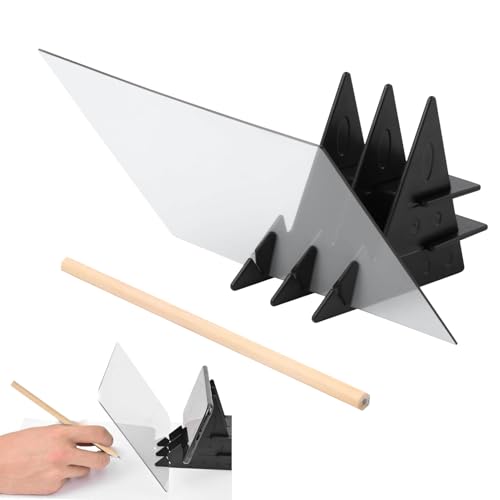 | Best Budget Pick | Primary Use Case: Optical image projection for tracing and painting | Projection Type: Optical (smartphone/tablet device-based projection) | Display Resolution: Not specified | CHECK ON AMAZON | Read Our Analysis |
| Art Projector for Tracing and Drawing on Canvas |  | Best for Canvas | Primary Use Case: Digital image projection for tracing, sketching, and painting | Projection Type: Digital (WiFi, Bluetooth, and cable connectivity) | Display Resolution: 1280×720 | CHECK ON AMAZON | Read Our Analysis |
| Artograph Flare 100 Digital Art Projector with Stand |  | Professional Grade | Primary Use Case: Digital image projection with art grids for accurate placement | Projection Type: Digital (HDMI, USB, TF card, WiFi) | Display Resolution: Native 1920×1080 with up to 3840×2160 support | CHECK ON AMAZON | Read Our Analysis |
| Artograph EZ Tracer Opaque Art Projector with LED Bulb |  | Best LED Efficiency | Primary Use Case: LED bulb for opaque image enlargement (2x-10x) | Projection Type: Opaque (LED bulb for paper image enlargement) | Display Resolution: Not applicable (LED bulb only) | CHECK ON AMAZON | Read Our Analysis |
| CiBest Mini Projector Full HD 1080P Portable |  | Most Compact | Primary Use Case: Mini projector for home cinema and portable entertainment | Projection Type: Digital (HDMI, USB, AV connectivity) | Display Resolution: 1080P Full HD | CHECK ON AMAZON | Read Our Analysis |
| Optical Image Drawing Board Projector Sketch Tracing Tool |  | Best for Sketching | Primary Use Case: Optical image projection for tracing and sketching | Projection Type: Optical (smartphone/tablet device-based projection) | Display Resolution: Not specified | CHECK ON AMAZON | Read Our Analysis |
More Details on Our Top Picks
Artograph EZ Tracer Opaque Art Projector with Enlargement
The Artograph EZ Tracer is your ideal choice if you’re scaling up paper-based artwork—photographs, sketches, or drawings—onto walls, canvases, or other vertical surfaces. This portable light box enlarges images 2x to 10x their original size using a 163mm optical glass lens. You’ll work with a 4″ x 4″ copy area, handling larger pieces in sections. The projector requires a dark room and an LED bulb (not included) for best image clarity. At just 2.15 pounds, it’s highly portable. Note that you can’t project directly from phones or tablets—only physical paper images work. With its straightforward setup and 1-year warranty, you’ve got a reliable tool for tracing enlargements.
- Primary Use Case:Opaque image enlargement (2x-10x) for tracing
- Projection Type:Opaque (non-digital paper images only)
- Display Resolution:Not applicable (opaque projector)
- Portability & Weight:2.15 pounds; portable lightweight light box
- Projection Size Range:2x to 10x enlargement of 4″ x 4″ copy area
- Included Accessories:Power cord and user manual
- Additional Feature:2x to 10x enlargement capability
- Additional Feature:163mm optical glass lens
- Additional Feature:LED bulb recommended (not included)
Optical Drawing Board Projector for Artists and Students
If you’re an artist, student, or beginner looking to scale up sketches and paintings without the hassle of traditional grid methods, an optical drawing board projector offers a game-changing solution. This portable device projects digital images directly onto paper, fabric, or wood, letting you trace precise outlines effortlessly. You’ll appreciate the scratch-resistant ABS plastic construction and simple assembly. Adjust brightness via your phone or tablet for best possible clarity. The mobile holder accommodates two splicing methods, making setup quick and intuitive. Whether practicing calligraphy, developing hand-eye coordination, or refining painting skills, you’ll access unlimited image resources through the app. Its carry-ready design means inspiration travels with you anywhere.
- Primary Use Case:Digital image projection for painting/sketching
- Projection Type:Digital (smartphone/tablet screen mirroring)
- Display Resolution:Not specified
- Portability & Weight:Portable and carry-ready
- Projection Size Range:Not specified
- Included Accessories:Mobile holder with two assembly methods
- Additional Feature:Projects digital device images
- Additional Feature:Brightness adjustment via phone/tablet
- Additional Feature:Mobile holder with dual methods
Artograph LED Tracer Opaque Art Projector with Enlargement
For artists and crafters who need to scale smaller designs up to 14 times their original size, Artograph’s LED Tracer offers remarkable versatility without the bulk of professional equipment. You’ll appreciate its portability and straightforward operation—simply place your 5×5-inch artwork underneath, project it, and begin tracing. The 200mm optical glass lens delivers crisp projections, while the high-intensity LED runs cooler and lasts longer than traditional bulbs. Its compact dimensions make it perfect for studios, classrooms, or guest rooms. For best results, work in a darkened space and tackle larger designs in sections. Whether you’re creating murals, quilts, or wall décor, this reliable tool combines durability with user-friendly functionality.
- Primary Use Case:Opaque image enlargement (up to 14x) for tracing
- Projection Type:Opaque (non-digital paper images only)
- Display Resolution:Not applicable (opaque projector)
- Portability & Weight:Portable and user-friendly
- Projection Size Range:Up to 14x enlargement of 5″ x 5″ design
- Included Accessories:Standard power cord (bulb not included)
- Additional Feature:5×5 inch original size reference
- Additional Feature:Up to 14x enlargement capacity
- Additional Feature:200mm optical glass lens
Caydo P1 Art Projector with Auto Focus & Keystone
Artists and designers seeking a projector that combines precision with portability will find the Caydo P1 particularly compelling. This compact device projects images up to 100 inches from distances of 3.1 to 10.5 feet, supporting 4K resolution for sharp detail work. You’ll appreciate the auto-focus and keystone correction features, which guarantee accurate image scaling without manual adjustments. The built-in drawing software offers gridifying, sketching, and comic modes with 360° rotation and 3×3 grid overlays. Quick image transfer via QR code or USB eliminates network dependency, while dual-frequency WiFi and Bluetooth 5.0 connectivity keep your creative process seamless. The sealed optical system prevents dust accumulation, extending the lamp’s 10,000-hour lifespan.
- Primary Use Case:Digital image projection with drawing software tools
- Projection Type:Digital (smartphone/tablet and device connectivity)
- Display Resolution:4K support
- Portability & Weight:Compact and portable
- Projection Size Range:3.1ft–10.5ft distance; up to 100″ display
- Included Accessories:Remote control (requires 2 AAA batteries)
- Additional Feature:Built-in drawing software included
- Additional Feature:Auto focus and keystone correction
- Additional Feature:Ultra-fast dual-frequency WiFi
Drawing Projector Art Tracing Tool with Stand
The GIKUCNZL projector combines versatility with portability, making it an excellent choice if you’re looking to scale artwork without sacrificing functionality. You’ll appreciate its dual-purpose design—it works seamlessly for tracing images onto canvas and delivers high-performance projection for presentations or movies. With 1280×720 native resolution and 4K support, you get crisp, vibrant imagery up to 10.5 feet. The included adjustable stand rotates 360 degrees for ideal positioning, while wireless and wired connectivity accommodate smartphones, tablets, and laptops. At just 2.2 pounds, you’re getting a compact, portable solution that doesn’t compromise on quality or reach.
- Primary Use Case:Dual-purpose tracing projector and movie/presentation projector
- Projection Type:Digital (wireless and wired screen mirroring)
- Display Resolution:1280×720 with 4K support
- Portability & Weight:2.2 pounds; compact 3.2″ x 3.2″ x 4.7″
- Projection Size Range:Up to 10.5 feet maximum
- Included Accessories:Stand up to 34 inches with 360° rotation
- Additional Feature:Included 34-inch adjustable stand
- Additional Feature:360° rotation capability
- Additional Feature:4K support with HDR clarity
Art Projector for Tracing Drawing Painting (White)
If you’re looking to scale artwork onto canvas or paper with precision, this white art projector delivers 1920×1080 FHD resolution that captures intricate details and accurate colors. You’ll appreciate the flexible connectivity—upload images via USB, mirror your smartphone wirelessly, or use wired screen sharing. The all-metal stand rotates 360°, letting you project from any angle while maintaining stable, perfectly aligned images. Its versatile base adapts to various workspaces. Whether you’re tracing designs, copying artwork, or projecting reference images, this projector streamlines your creative process. It’s an excellent gift for kids, families, and professional artists alike, combining practicality with reliable performance.
- Primary Use Case:Digital image projection for tracing and copying
- Projection Type:Digital (USB, WiFi, and wired screen mirroring)
- Display Resolution:1920×1080 FHD
- Portability & Weight:Compact and portable
- Projection Size Range:Up to 10.5 feet maximum
- Included Accessories:All-metal stand with 360° rotation
- Additional Feature:1920×1080 FHD resolution
- Additional Feature:All-metal stand construction
- Additional Feature:USB playback delivers sharpest projection
MEDAMOC Art Projector for Drawing and Tracing
Looking for a projector that won’t weigh down your creative process? The MEDAMOC Art Projector delivers exactly that. At just 3 pounds, you’ll easily transport it between studios, classrooms, or home setups. Its 1280×720 resolution projects crisp images perfect for tracing murals, crafts, and cakes. You’ll connect seamlessly via WiFi, USB, or cable from your iOS, Android device, or computer. The compact 7.5 x 3.9 x 17.1-inch design fits anywhere without sacrificing stability. Whether you’re sketching, painting, or helping kids explore their creativity, this mini projector handles it all reliably.
- Primary Use Case:Digital image projection for tracing and drawing
- Projection Type:Digital (WiFi, USB, and cable connectivity)
- Display Resolution:1280×720
- Portability & Weight:3 pounds; portable and compact
- Projection Size Range:Not specified
- Included Accessories:Not specified
- Additional Feature:1280×720 resolution
- Additional Feature:Universal device support (iOS/Android)
- Additional Feature:2.4G WiFi and USB connectivity
Art Projector for Tracing and Drawing with Stand
Artists who want to scale artwork efficiently without compromising on versatility should consider this dual-purpose projector. You’ll project images up to 10.5 feet on canvas, desktops, or walls with stunning clarity. The 1280×720 resolution supports 4K compatibility and HDR, delivering vibrant, sharp visuals at any size. You’ll connect seamlessly via smartphones, tablets, laptops, gaming consoles, or USB drives with wireless and wired mirroring options. The portable 3.2″ x 3.2″ x 4.7″ design weighs just 2.2 lbs, while the included stand extends up to 34 inches with 360° rotation for stable, flexible projections. Responsive customer support responds within 12 hours.
- Primary Use Case:Dual-purpose tracing projector and movie/presentation projector
- Projection Type:Digital (wireless and wired screen mirroring)
- Display Resolution:1280×720 with 4K support
- Portability & Weight:2.2 pounds; compact 3.2″ x 3.2″ x 4.7″
- Projection Size Range:Up to 10.5 feet maximum
- Included Accessories:Stand up to 34 inches with 360° rotation
- Additional Feature:Included stand up to 34 inches
- Additional Feature:360° rotation capability
- Additional Feature:1280×720 with 4K support
Magcubic HY300PRO Mini Projector 4K WiFi Bluetooth
The Magcubic HY300PRO delivers portability without sacrificing performance, making it an excellent choice for artists who need to scale artwork on-the-go. Its 30% smaller design fits easily into your backpack, while the 180° rotating stand adapts to any angle you’re working with. You’ll appreciate the native 720P resolution with 4K support, delivering sharp detail for tracing and drawing. The 200 ANSI lumens brightness guarantees visibility in various lighting conditions, and the 8000:1 contrast ratio captures fine lines precisely. WiFi and Bluetooth connectivity let you stream reference images instantly from your devices, while HDMI and USB ports provide flexible setup options wherever inspiration strikes.
- Primary Use Case:Portable mini projector for casual viewing and entertainment
- Projection Type:Digital (WiFi and Bluetooth streaming)
- Display Resolution:Native 720P with 4K support
- Portability & Weight:0.52 kg (1.15 lbs); backpack-ready pocket-sized
- Projection Size Range:Casual viewing in typical home spaces
- Included Accessories:180° rotating stand; built-in apps
- Additional Feature:30% smaller than previous model
- Additional Feature:180° rotating stand included
- Additional Feature:Built-in multiple streaming apps
Optical Drawing Board Tracing Projector for Artists and Kids
If you’re seeking a straightforward way to scale artwork without technical complexity, an optical drawing board tracing projector delivers exactly that. You’ll download an app, import your chosen image, and position your phone on the lightweight ABS plastic stand. The high-quality PMMA lens projects your image onto paper, fabric, or wood surfaces with clarity. You’ll trace the projected outline without requiring drawing skills. This compact device suits kids, beginners, and experienced artists alike, enhancing hand-eye coordination while you practice calligraphy and refine techniques. The double-sided tracing board offers multiple projection effects, making it versatile for transforming digital photos into tangible practice material.
- Primary Use Case:Optical image projection for tracing and painting
- Projection Type:Optical (smartphone/tablet device-based projection)
- Display Resolution:Not specified
- Portability & Weight:Lightweight, easy to assemble/disassemble
- Projection Size Range:Not specified
- Included Accessories:Base stand; simple assembly/disassembly
- Additional Feature:Double-sided tracing board surfaces
- Additional Feature:High-quality optical PMMA lens
- Additional Feature:Lightweight ABS plastic stand
Art Projector for Tracing and Drawing on Canvas
For anyone looking to scale artwork onto canvas without manual grid work, the Dyhodu Art Projector for Tracing and Drawing offers an efficient solution. This compact projector delivers 1280×720 HD resolution and projects images between 9.5–150 inches, letting you enlarge sketches to your desired size. Its automatic keystone correction and manual focus adjustment guarantee sharp, properly aligned projections on any surface. With built-in WiFi and Bluetooth 5.0, you’ll connect your iOS, Android, Mac, or Windows device seamlessly. Weighing just three pounds, it’s portable enough for studio or on-site work. The short-throw design means you’ll need minimal distance between projector and canvas, making it practical for cramped creative spaces.
- Primary Use Case:Digital image projection for tracing, sketching, and painting
- Projection Type:Digital (WiFi, Bluetooth, and cable connectivity)
- Display Resolution:1280×720
- Portability & Weight:3 pounds; 7.5 × 3.9 × 17.1 inches
- Projection Size Range:9.5–150 inches
- Included Accessories:Built-in speakers and short throw features
- Additional Feature:Manual focus adjustment
- Additional Feature:Automatic keystone correction
- Additional Feature:Built-in 2.4G WiFi connectivity
Artograph Flare 100 Digital Art Projector with Stand
Artists seeking a projector that combines portability with professional-grade features will find the Artograph Flare 100 an excellent choice. You’ll appreciate its adjustable monopod arm, which extends from 30 to 100 inches, letting you position it at various heights and angles on any surface. The native 1920×1080 resolution supports up to 4K output, while five built-in art grids ensure precise image placement. With 300 lumens of brightness and a 2000:1 contrast ratio, you’ll get clear, detailed projections. Multiple connectivity options—HDMI, USB-A, TF card, and WiFi—give you flexibility in image sources. Manual focus and keystone correction let you fine-tune your setup quickly, making this projector ideal for scaling artwork accurately.
- Primary Use Case:Digital image projection with art grids for accurate placement
- Projection Type:Digital (HDMI, USB, TF card, WiFi)
- Display Resolution:Native 1920×1080 with up to 3840×2160 support
- Portability & Weight:Adjustable monopod arm; 30–100 inches projection range
- Projection Size Range:30–100 inches via adjustable monopod arm
- Included Accessories:Monopod arm, HDMI cable, power cable, remote control, user manual
- Additional Feature:Five built-in art grids
- Additional Feature:30–100 inch adjustable monopod arm
- Additional Feature:Native 1920×1080 resolution
Artograph EZ Tracer Opaque Art Projector with LED Bulb
The Artograph EZ Tracer stands out as an excellent choice when you’re scaling detailed designs up to 10 times their original size without sacrificing clarity or safety. Its 25W LED bulb delivers 3,050 lumens of daylight white illumination while consuming a fraction of energy compared to traditional 200W incandescent bulbs. You’ll appreciate the instant-on technology and whisper-quiet operation, perfect for focused creative work. The projector enlarges 4×4-inch designs onto walls or easels for murals, signs, and paintings. With a 25,000-hour lifespan, UV-free light, and portable design, you’re investing in reliable performance. Simply plug it in and start projecting—no complicated setup required for your artistic vision.
- Primary Use Case:LED bulb for opaque image enlargement (2x-10x)
- Projection Type:Opaque (LED bulb for paper image enlargement)
- Display Resolution:Not applicable (LED bulb only)
- Portability & Weight:Lightweight and portable
- Projection Size Range:2x to 10x enlargement of 4″ x 4″ design
- Included Accessories:Power cord
- Additional Feature:25W LED bulb included
- Additional Feature:25,000-hour lifespan
- Additional Feature:Energy-saving UV-free illumination
CiBest Mini Projector Full HD 1080P Portable
If you’re seeking a projector that won’t weigh down your studio or travel kit, CiBest’s Mini Projector delivers impressive performance in a pocket-sized package weighing just 0.52 kg. You’ll appreciate its 1080P Full HD display spanning 30–200 inches, with ideal viewing at 60–130 inches. The LED technology provides uniform illumination and brighter, clearer edges, while diffuse reflection tech protects your eyes during extended work sessions. You’ll connect via HDMI, USB, or AV to phones, tablets, laptops, and TV boxes. Built-in Hi-Fi stereo speakers offer solid audio, though you can plug in external speakers for enhanced sound. Advanced temperature control reduces fan noise by approximately 80%, creating a quieter working environment. CiBest backs this projector with a three-year replacement warranty and lifetime support.
- Primary Use Case:Mini projector for home cinema and portable entertainment
- Projection Type:Digital (HDMI, USB, AV connectivity)
- Display Resolution:1080P Full HD
- Portability & Weight:0.52 kg (1.15 lbs); pocket-sized 5.5 × 2.36 × 4.33 inches
- Projection Size Range:30–200 inches (recommended 60–130 inches)
- Included Accessories:Built-in Hi-Fi stereo speakers
- Additional Feature:Eye-protection diffuse reflection tech
- Additional Feature:~80% reduced fan noise
- Additional Feature:Three-year product replacement warranty
Optical Image Drawing Board Projector Sketch Tracing Tool
For anyone seeking a budget-friendly solution to scale artwork without breaking the bank, an optical image drawing board projector delivers results through simple, proven technology. You’ll mount your phone or tablet to project images onto paper, fabric, or wood surfaces. The compact 8 x 5.3-inch device uses optical imaging to trace designs with precision. Simply maximize your device’s brightness, import your image, and convert it to sketch mode through the app. This portable projector suits calligraphy practice, comic creation, and skill development for beginners and experienced artists alike. Its lightweight design and quick-assembly stand make it genuinely portable for studio or on-the-go work.
- Primary Use Case:Optical image projection for tracing and sketching
- Projection Type:Optical (smartphone/tablet device-based projection)
- Display Resolution:Not specified
- Portability & Weight:3.87 ounces; 8 x 5.3 x 0.4 inches
- Projection Size Range:Not specified
- Included Accessories:Plastic base stand; simple assembly/disassembly
- Additional Feature:8 x 5.3 inch compact size
- Additional Feature:Two quick-install assembly methods
- Additional Feature:Supports paper, fabric, wood surfaces
Factors to Consider When Choosing Projectors for Scaling Artwork Up
When you’re selecting a projector for scaling artwork, you’ll want to evaluate its enlargement capability to guarantee it can achieve your desired size without sacrificing image quality. You should also consider the optical clarity, portability for different workspaces, the room’s ambient lighting conditions, and whether the projector accepts your image sources—whether that’s digital files, slides, or physical artwork.
Enlargement Capability and Range
You’ll find that most art projectors offer enlargement ranges between 2× and 14×, though this varies considerably by model and device type. Some projectors maintain a fixed original size—typically 4×4 inches—and scale it dramatically for wall or canvas work. For larger originals, you’ll need to work in sections to preserve detail at your desired scale.
Your enlargement choice directly impacts other decisions. Darker rooms yield crisper projections, so consider your workspace lighting. Higher enlargement ratios demand brighter, cooler light sources to prevent overheating while maintaining sharpness. Before purchasing, assess your typical artwork size and desired output dimensions to guarantee the projector’s range matches your needs.
Optical Quality and Clarity
The sharpness of your projection directly determines how accurately you can scale and trace artwork onto larger surfaces. You’ll want larger optical lenses—163 mm or 200 mm—that deliver uniform, sharp projections essential for enlarging intricate designs. Native resolutions of 1280×720 up to 1920×1080, with 4K support, provide the crisp detail you need when working with complex artwork. Brightness matters too; 300 lumens or higher guarantees your projection remains clear in dimly lit spaces, eliminating shadows that obscure fine line work. Manual focus and keystone correction tools let you maintain edge accuracy and prevent distortion on vertical surfaces. Finally, consider your throw characteristics—whether short or long throw suits your workspace—since projection distance directly affects image clarity at your target size.
Portability and Setup Ease
How portable does your projector need to be? You’ll want a lightweight unit weighing roughly 2–3 pounds with compact dimensions so you can easily transport it between studios or client spaces. Built-in stands or adjustable arms extending up to 34 inches let you quickly position and stabilize your projector without hunting for extra accessories. Wireless or screen-mirroring connectivity via WiFi or Bluetooth eliminates cable hassles and accelerates setup. Short-throw or small-form-factor models prove invaluable when working in cramped areas, allowing you to project from closer distances. Features like auto focus and keystone correction further streamline alignment, reducing fiddly adjustments and letting you scale artwork faster. These combined elements transform setup from a time-consuming chore into a seamless process.
Room Lighting Requirements
Because ambient light directly undermines projection clarity, you’ll need to carefully assess your workspace’s lighting conditions when selecting a projector for scaling artwork. Dark rooms naturally enhance image contrast and legibility, making them ideal for tracing and enlargement work. If you’re working in a brighter space, you’ll require a projector with higher lumens output to combat washed-out visuals.
Beyond room darkness, wall surface matters notably. Non-reflective, dark walls minimize ambient reflections that degrade projection quality. Take practical steps to optimize your environment: close blinds and curtains, turn off ceiling lights, and eliminate stray light sources during projection sessions.
Many projectors perform most effectively in dedicated, dark workspaces. Evaluate your room’s natural and artificial lighting before purchasing to guarantee your chosen projector delivers the clarity you need for accurate artwork scaling.
Compatible Image Sources
Once you’ve optimized your workspace lighting, you’ll need to think about how you’ll get images into your projector. Different models offer varying connectivity options, so you’ll want to choose one that matches your workflow. Some projectors support wireless screen mirroring from smartphones and tablets, while others require USB drives, SD cards, or computer connections. Certain models let you load internet-sourced images directly through built-in apps, giving you flexibility in your design sources. Consider cross-platform compatibility too—whether you’re working on iOS, Android, Mac, or Windows, you’ll want seamless image transfer. Verify your projector supports your preferred content source, whether that’s USB playback, WiFi sharing, or app-based importing, to guarantee smooth artwork scaling without technical bottlenecks.
Durability and Lens Design
Your projector’s longevity and image quality depend heavily on its structural integrity and optical components. When selecting a projector for scaling artwork, you’ll want to prioritize models featuring sealed or dust-resistant optical cores with sturdy all-metal frames that withstand frequent handling.
Lens quality matters substantially—larger optical glass lenses (163 mm or 200 mm) deliver sharper images and more accurate enlargement scaling. LED-based projections offer extended service life, typically reaching 25,000 hours, while operating cooler to minimize heat-related wear on lens assemblies.
Auto focus and keystone correction features enhance reliability by reducing repeated handling that degrades components over time. Finally, maintain your projector in a dust-sealed enclosure whenever possible, minimizing debris exposure to preserve lens clarity and protect your investment during routine tracing work.
Frequently Asked Questions
How Do I Maintain and Clean the Projector Lens Without Damaging It?
You’ll want to use a soft brush or compressed air first to remove dust. Then gently wipe the lens with a microfiber cloth using circular motions. Avoid touching the glass directly with your fingers.
What Warranty Coverage Do Art Projectors Typically Include for Defects?
You’ll typically find one to three-year warranties covering defects like lens issues, bulb failures, and mechanical problems. Most manufacturers exclude damage from improper maintenance, accidents, or normal wear. You should always review your specific projector’s warranty documentation.
Can I Use Art Projectors With Both Digital and Traditional Artwork?
You can absolutely use art projectors with both digital and traditional artwork. You’ll project digital images directly, while you can photograph or scan traditional pieces first, then project them onto canvas or paper for scaling and tracing purposes.
How Long Do Projector Bulbs Last Before Needing Replacement?
You’ll typically get 2,000 to 5,000 hours from standard projector bulbs, though premium models can reach 10,000 hours. You’ll need replacement bulbs every 1-3 years depending on usage frequency and brightness settings.
Are Art Projectors Suitable for Outdoor or Well-Lit Studio Environments?
You’ll find that standard art projectors aren’t ideal for outdoor or brightly lit studios. You’ll need high-lumen projectors designed for bright environments. They’re more expensive, but you’ll get the visibility and accuracy you’re seeking.

Leave a Reply